Understanding Tech Neck and Its Causes
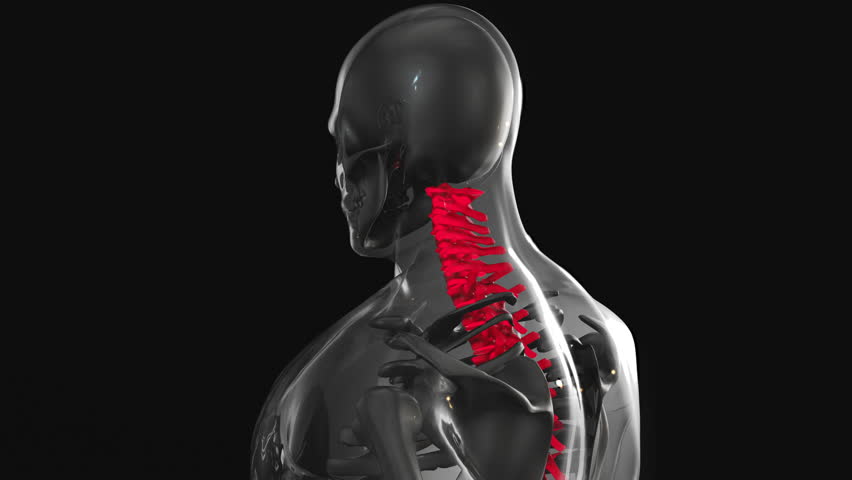
Tech neck, a modern ergonomic challenge, occurs when excessive device use—like smartphones, laptops, and tablets—forces the head into a forward position, straining the cervical spine. Remote workers often juggle multiple screens, leading to prolonged poor posture. This misalignment can cause chronic neck pain, headaches, and reduced mobility. The weight of the head, which averages 10-12 pounds, increases stress on the neck when tilted forward. Repetitive strain from typing or swiping further exacerbates the issue. Recognizing these patterns is key to addressing the problem. By understanding the mechanics of tech neck, individuals can take proactive steps to mitigate its effects. Awareness of posture and device usage habits forms the foundation for effective prevention strategies.
Ergonomic Adjustments for Workspaces
Optimizing your workspace is crucial for reducing tech neck. Position monitors at eye level to avoid tilting the head downward. Use a stand or stack books to raise your laptop to a comfortable height. Keyboards and mice should be placed so your elbows are at 90-degree angles, keeping wrists neutral. Adjust chair height so feet rest flat on the floor, and consider a lumbar support cushion for lower back alignment. Regularly reposition devices to prevent one-sided strain. A standing desk can also help by allowing periodic shifts between sitting and standing. These adjustments minimize the need for forward head posture, distributing physical stress more evenly. Small changes in workspace setup can lead to significant long-term benefits for spinal health.
Corrective Exercises for Postural Balance
Incorporating targeted exercises can counteract tech neck by strengthening weakened muscles and stretching tight ones. Chin tucks, where you gently pull the chin inward while keeping the head level, help realign the cervical spine. Shoulder blade squeezes—bringing the shoulder blades together—improve upper back strength and posture. Neck stretches, such as tilting the head side to side or gently rotating it, relieve tension. Wall angels, where you press your back, shoulders, and head against a wall while moving arms overhead, enhance posture. These exercises should be done regularly, ideally 2-3 times daily. Consistency is key to building muscle memory and correcting habitual poor posture. Combining these movements with mindful awareness of body positioning amplifies their effectiveness.
Postural Corrections to Alleviate Strain
Maintaining proper posture during device use requires conscious effort and habit formation. Keep the head aligned with the shoulders, avoiding forward head posture. Use a mirror or smartphone camera to check your alignment periodically. Adjust seating so the spine is straight, with hips slightly higher than knees. Avoid slouching or crossing legs, which can distort spinal curvature. When using a phone, hold it at eye level to prevent neck bending. Taking frequent breaks to stand, stretch, or walk helps reset posture. Apps that remind users to adjust their position can be useful. Over time, these corrections become second nature, reducing the cumulative strain of prolonged device use on the neck and upper back.
Integrating Movement into Daily Routines
Regular movement breaks are essential for preventing tech neck. Every 30-60 minutes, stand up, stretch, or walk for a few minutes to relieve muscle stiffness. Simple exercises like neck rotations, shoulder rolls, or seated torso twists can be done at a desk. Incorporating short walks or stair climbing during breaks promotes circulation and reduces sedentary strain. Even light activity, such as fidgeting or using a stability ball as a chair, engages core muscles and improves posture. Staying active throughout the day counteracts the static postures that contribute to tech neck. Combining movement with ergonomic adjustments creates a holistic approach to spinal health, making it easier to maintain proper alignment during long work sessions.
When to Seek Professional Guidance
If tech neck symptoms persist or worsen, consulting a chiropractor or ergonomic specialist is advisable. A chiropractor can assess spinal alignment and recommend adjustments or therapies to alleviate pain. Ergonomic experts can evaluate your workspace setup and suggest personalized modifications. Physical therapists may also provide targeted exercises to strengthen supporting muscles. Professional guidance ensures that interventions are tailored to individual needs, avoiding potential harm from improper techniques. Early intervention can prevent chronic issues and restore mobility. Remote workers should prioritize regular check-ins with healthcare providers to address posture-related concerns proactively and maintain long-term spinal health.