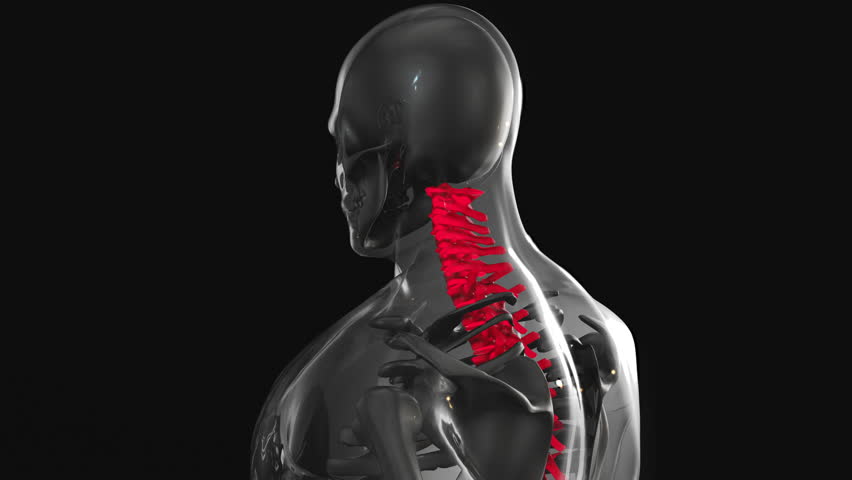
Introduction to 3D Modeling in Chiropractic Education
3D modeling software has emerged as a powerful tool in chiropractic education, offering a dynamic way to visualize complex anatomical structures. For patients with chronic mid-back pain, understanding the thoracic spine's mechanics can be challenging through traditional methods alone. By using 3D models, chiropractors can illustrate how decompression techniques target specific areas of the spine, such as vertebral joints and intervertebral discs. This technology allows for interactive exploration, enabling patients to see how adjustments may relieve pressure and improve mobility. While 3D modeling is not a substitute for hands-on care, it serves as an educational aid to enhance patient comprehension. Its use aligns with modern trends in healthcare, where visual learning supports informed decision-making. Chiropractors can leverage this tool to bridge the gap between technical knowledge and patient understanding.
Benefits of Visual Learning for Chronic Mid-Back Pain
Patients with chronic mid-back pain often struggle to grasp how spinal adjustments address their discomfort. Visual learning through 3D modeling provides clarity by breaking down complex processes into digestible components. For instance, a 3D animation can demonstrate how thoracic spine decompression reduces nerve compression or alleviates muscle tension. This approach helps patients connect their symptoms to anatomical structures, fostering a sense of empowerment. Studies suggest that visual aids improve retention of medical information, which can lead to better treatment adherence. Additionally, 3D models can highlight the progressive nature of decompression therapy, showing how repeated sessions may yield cumulative benefits. By making abstract concepts tangible, chiropractors can strengthen patient engagement and trust in their care plan.
How 3D Software Demonstrates Decompression Techniques
Chiropractors can use 3D modeling software to simulate thoracic spine decompression techniques, such as flexion-distraction or mechanical traction. These tools allow practitioners to create detailed, real-time visualizations of how adjustments apply controlled forces to specific spinal regions. For example, a 3D model might show the gradual separation of vertebral segments during decompression, illustrating reduced disc pressure. This visualization can be tailored to a patient’s unique condition, making the explanation more personalized. Some software enables interactive elements, such as rotating the model to view the spine from multiple angles or highlighting areas of concern. By demonstrating the mechanics of decompression, chiropractors can address patient questions about safety and efficacy. This method also helps patients understand the purpose of each step in their treatment, reducing anxiety and fostering cooperation.
Enhancing Patient Engagement and Understanding
Engaging patients in their care is critical for successful outcomes, and 3D modeling software plays a key role in this process. By providing a visual representation of thoracic spine decompression, chiropractors can address common misconceptions about spinal adjustments. For example, patients may fear that decompression is painful, but a 3D animation can show how the technique is designed to be gentle and targeted. This transparency can ease concerns and build confidence in the treatment. Additionally, 3D models can be used to explain the relationship between spinal alignment and overall body function, helping patients see the broader benefits of care. Interactive elements, such as step-by-step breakdowns of decompression procedures, allow patients to ask questions and participate in their learning. This collaborative approach strengthens the patient-provider relationship and promotes long-term adherence to care plans.
Integration with Traditional Chiropractic Methods
While 3D modeling software is a valuable educational tool, it complements—not replaces—traditional chiropractic techniques. Chiropractors can use 3D visuals to prepare patients for manual adjustments, ensuring they understand the goals of each session. For example, a model might show how a specific adjustment aligns the thoracic spine, making the physical process more relatable. This integration also supports follow-up discussions, as patients can reference the 3D demonstration during subsequent visits. However, it’s important to emphasize that 3D modeling is not a diagnostic or therapeutic tool on its own. A qualified chiropractor must assess each patient’s condition and determine whether decompression techniques are appropriate. By combining technology with hands-on care, practitioners can offer a holistic approach that addresses both the physical and educational aspects of treatment.
Considerations for Effective Implementation
Chiropractors interested in using 3D modeling software should consider factors like software accessibility, training, and patient preferences. Not all 3D tools are created equal, so selecting user-friendly platforms that align with clinical goals is essential. Practitioners may need to invest time in learning how to create or access relevant anatomical models. Additionally, some patients may prefer traditional explanations, so it’s important to offer multiple ways to convey information. Privacy and data security should also be prioritized when using digital tools. Ultimately, the decision to incorporate 3D modeling should be based on how it enhances patient understanding without overshadowing the importance of individualized care. Chiropractors should discuss the use of such technology with their patients, ensuring it aligns with their comfort level and treatment needs.