Understanding Tech Neck and Its Impact on Office Workers
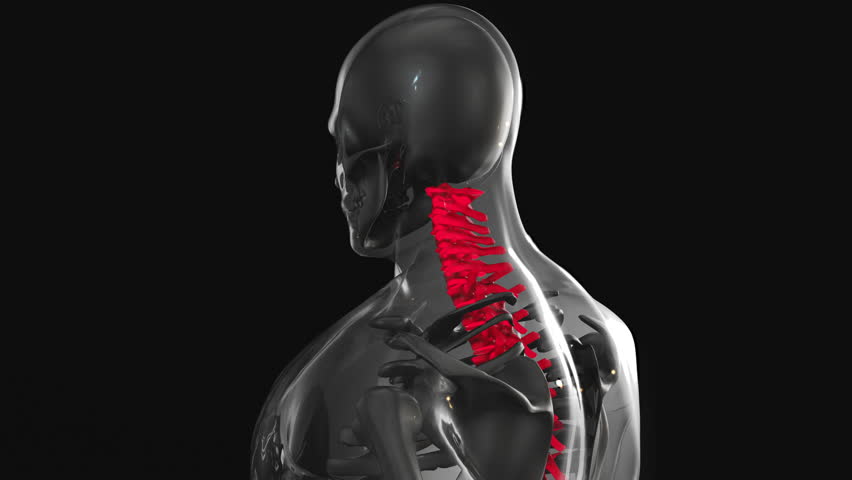
Tech neck, a modern condition caused by prolonged forward head posture while using digital devices, affects millions of office workers. This habit strains the cervical spine, leading to chronic pain, reduced mobility, and even headaches. Chiropractors play a vital role in addressing this issue by combining spinal adjustments with ergonomic guidance. By analyzing workplace setups, they can identify postural imbalances and recommend modifications to reduce strain. Proper ergonomics not only alleviates symptoms but also prevents long-term damage. Office environments often lack awareness of correct posture, making it essential for chiropractors to educate patients on sustainable adjustments. Understanding the connection between workstation design and spinal health empowers individuals to take proactive steps toward relief.
Assessing the Workstation for Postural Issues
A chiropractor’s first step in designing an ergonomic setup is to evaluate the patient’s current workspace. This involves observing how the individual sits, the height of their monitor, and the positioning of their keyboard and mouse. Poorly adjusted furniture, such as chairs without lumbar support or desks at incorrect heights, exacerbates tech neck. Chiropractors may use posture assessments or gait analyses to identify misalignments. They also consider the patient’s daily routines, such as frequent phone use or prolonged typing. By pinpointing specific stress points, they can tailor recommendations to the individual’s lifestyle. This personalized approach ensures that adjustments address both immediate discomfort and underlying structural issues.
Adjusting Monitor Height and Viewing Distance
One of the most critical ergonomic adjustments for tech neck is positioning the monitor at eye level. When screens are too low, the head tilts forward, increasing pressure on the cervical spine. Chiropractors advise using monitor stands or adjustable chairs to achieve this alignment. Additionally, the distance between the eyes and the screen should be about an arm’s length to reduce eye strain and maintain a neutral head position. Some patients may benefit from dual-monitor setups to minimize head movement. By prioritizing visual comfort, these adjustments help maintain proper posture throughout the workday. Chiropractors often collaborate with occupational therapists to ensure these changes align with broader ergonomic principles.
Optimizing Keyboard and Mouse Placement
Proper keyboard and mouse positioning is essential for preventing tech neck. Chiropractors recommend placing the keyboard at elbow height with wrists straight to avoid slouching. Mouse placement should be close to the body to prevent reaching, which can cause shoulder and neck strain. Vertical mice or trackballs may be suggested for individuals with repetitive strain injuries. Ergonomic keyboards with split designs can also reduce tension in the upper back and shoulders. Chiropractors emphasize the importance of frequent breaks and stretching exercises to counteract static postures. These adjustments, when combined with regular spinal checkups, create a holistic approach to managing tech neck symptoms.
Choosing the Right Chair and Supportive Accessories
A supportive chair is foundational to an ergonomic workstation. Chiropractors often recommend chairs with adjustable lumbar support, armrests, and seat depth to promote proper spinal alignment. Seats with built-in cushioning for the lower back help maintain the natural curve of the spine, reducing pressure on the neck and shoulders. Footrests may be necessary for individuals with shorter legs to keep feet flat on the floor. Some chiropractors also suggest using headrests or cervical pillows to support the neck during breaks. By selecting the right chair and accessories, office workers can significantly reduce the risk of developing or worsening tech neck symptoms.
Implementing Additional Ergonomic Tools and Practices
Beyond furniture adjustments, chiropractors may recommend tools like standing desks, ergonomic keyboards, or posture-correcting devices. Standing desks allow for periodic shifts between sitting and standing, reducing continuous strain on the spine. Wrist rests and document holders can further minimize awkward postures. Chiropractors also emphasize the importance of regular movement, suggesting short stretching breaks every 30 minutes. Education on proper lifting techniques and screen usage habits complements these physical adjustments. By integrating these practices, office workers can create a sustainable workspace that supports long-term spinal health and prevents tech neck recurrence.