The Role of Visual Aids in Patient Education
Interactive visual aids play a critical role in helping patients grasp the principles of spinal adjustments. By translating complex anatomical concepts into accessible visuals, chiropractors can demystify procedures and build trust. These tools allow patients to see how misalignments affect the body and how adjustments restore balance. Visuals also empower patients to take an active role in their care, fostering better adherence to treatment plans. When patients understand the purpose and process of adjustments, they are more likely to engage with their care and report higher satisfaction. This educational approach aligns with modern healthcare trends that prioritize patient-centered communication and informed decision-making.
Types of Interactive Visual Aids
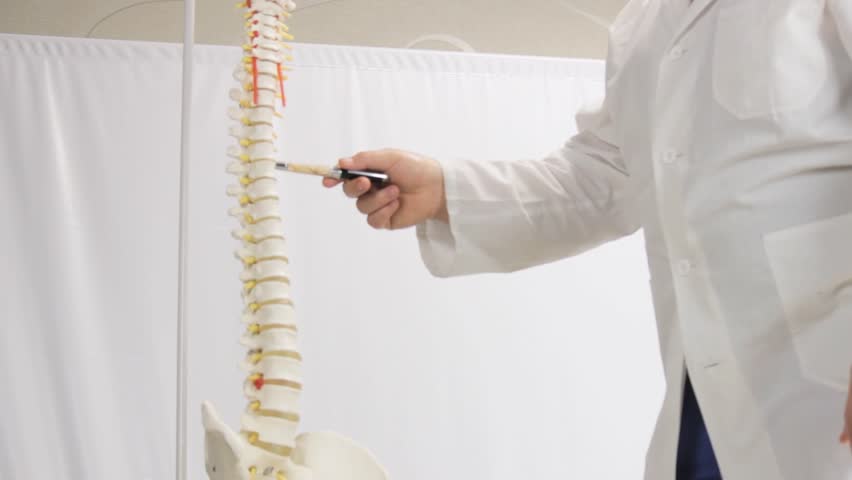
Chiropractors use a variety of interactive tools to demonstrate spinal adjustments. 3D anatomical models let patients physically explore the spine’s structure, while digital simulations show real-time changes during adjustments. Augmented reality (AR) apps can project virtual spine diagrams, allowing patients to visualize alignment shifts. Video animations explain joint mechanics and nerve pathways, making abstract concepts tangible. Some practices incorporate touchscreens or tablets to let patients interact with dynamic content. These aids cater to different learning styles, ensuring clarity for diverse audiences. By combining tactile, visual, and digital elements, chiropractors create a multi-sensory educational experience that reinforces key concepts about spinal health and treatment goals.
Enhancing Patient Understanding
Visual aids bridge the gap between technical chiropractic terminology and everyday language. When patients see a diagram of a misaligned vertebra, they better understand why adjustments are recommended. Interactive tools also highlight how spinal health impacts overall well-being, such as nerve function and posture. By observing simulations, patients can grasp the relationship between spinal alignment and pain relief. This transparency fosters confidence in the treatment process and reduces anxiety about unfamiliar procedures. Visual demonstrations also help patients track their progress over time, reinforcing the value of consistent care. Ultimately, these tools transform abstract medical information into relatable, actionable insights that support long-term health outcomes.
Practical Examples in Practice
During consultations, chiropractors might use a physical spine model to show how a specific adjustment targets a misaligned segment. Digital platforms can display before-and-after scenarios, illustrating improved posture or nerve function. Some offices use tablet-based apps that let patients manipulate virtual spine diagrams to see how adjustments affect different areas. Interactive videos might demonstrate the mechanics of a spinal correction in real time, while augmented reality devices overlay anatomical details onto a patient’s body. These examples make abstract concepts concrete, helping patients visualize their unique condition and treatment plan. By tailoring visuals to individual cases, chiropractors create personalized educational experiences that resonate with each patient’s needs.
Addressing Patient Concerns
Interactive visuals help alleviate common concerns about spinal adjustments. Patients often worry about safety, discomfort, or effectiveness—visual aids can address these by demonstrating the precision and gentleness of techniques. For example, a simulation might show how a chiropractor uses controlled force to correct misalignments without causing harm. Visuals can also clarify that adjustments target specific areas rather than the entire spine, reducing fears of widespread intervention. By illustrating the body’s natural healing responses, these tools reinforce the rationale behind treatment. This transparency builds trust and encourages open dialogue between patients and chiropractors. When patients see the process in action, they are more likely to feel informed and comfortable with their care decisions.
The Chiropractor's Role in Effective Demonstration
While visual aids are powerful tools, their effectiveness depends on how chiropractors present them. A skilled practitioner explains the purpose of each visual, connects it to the patient’s condition, and encourages questions. Demonstrations should be tailored to the patient’s knowledge level, avoiding jargon while maintaining scientific accuracy. Chiropractors might use visuals to reinforce key points during consultations or as part of follow-up sessions to track progress. By integrating these tools into regular interactions, practitioners create a culture of education and empowerment. Ultimately, the goal is to ensure patients leave with a clear understanding of their treatment and the confidence to participate actively in their recovery journey.